What it does
You spend an hour a day on LinkedIn reading other people's posts. The commenting is where the compounding happens — and it is also the part that dies first, because writing something worth reading under a stranger's post, twelve times, is genuinely tiring.
Booost Personal sits in the browser next to the post you are already reading. One click, and it drafts a comment: in your language, in your register, informed by what you do and who you are trying to reach. You get a text box with a draft in it, not a scheduled queue of things you have never seen.
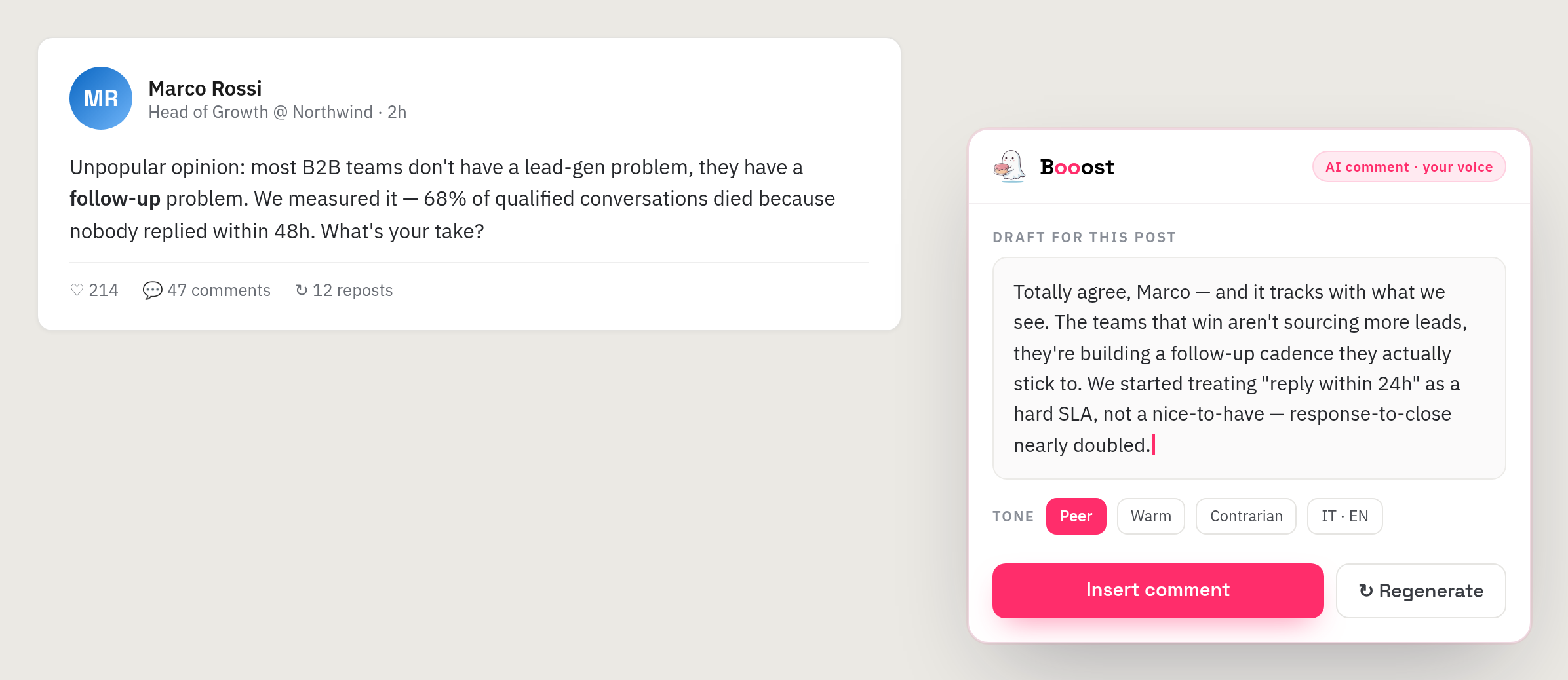
It also drafts posts: same voice, same grounding, from a topic you give it or from something you have just read.
Why it is different from everything else in this category
This is the only claim on our whole site that no competitor can copy, so it is worth being precise about it.
LinkedIn's User Agreement, §8.2, prohibits automated activity wherever it runs — and it names browser extensions explicitly. Every tool in this category is on the wrong side of that line, including Booost Business, and our acceptable use policy says so plainly.
Booost Personal is genuinely outside it. It does not act on LinkedIn. It writes text into a box; the click that publishes it is yours, made by you, in your own browser session. There is no queue, no scheduler, no headless browser, no action taken while you are asleep. That is not a legal opinion we are hoping holds — it is a description of what the software does.
The price of that honesty is that Personal will never do outreach. If you want campaigns, sequences and many accounts, that is Booost Business, and it is a different kind of tool with a different risk profile.
The three editions
Same extension in all three cases; your subscription decides what it does.
- 1 post a day, 5 comments, 10 reactions
- Drafting on your own AI key
- Your voice, learnt from a short interview
- A signature comment goes under everything you publish
- No daily ceilings on drafting
- No signature on what you publish
- Your own AI key across twenty providers — Ollama included, so the model can run on your own machine and the text never leaves it
- Comments and posts, in any language you write in
- No managed Booost AI
- Everything in Basic
- Booost's AI included — no key, no provider account, no separate AI bill
- The anti-cringe gate: the drafts that read like a LinkedIn parody get caught before you see them
- The parody mode, for when you want one on purpose
The editions are the same two ideas as on Business: Basic is the product on your own AI key, Pro includes ours. The difference is what they are measured in — Business counts LinkedIn accounts under management, Personal is one person and one account, and the ceiling is on what Community can draft in a day.
Honestly: it is not out yet
Booost Personal ships after Booost Business, which goes on sale on 1 September 2026. The extension is in development for Chrome and Firefox, the prices above are the ones it will launch at, and there is nothing to install today.
We would rather write that on the page than let you find out at the download button. If you want to be told when it lands, the contact page is the place to say so — and the roadmap is where its status changes first.
Questions this page gets asked
Does it post for me? No, and that is the point. It writes into the box; you press publish.
Chrome only? Chrome and Firefox at launch.
Does my LinkedIn password or session reach you? No. The extension works inside your own logged-in browser and never handles your credentials.
Can I use it with Booost Business? They are separate products and separate subscriptions. Business already writes comments and posts for the accounts it manages, so Personal is for people who do not want the desktop app at all.
What does "in your voice" actually mean? A short interview about your role, what you do and who you want to reach. Everything drafted afterwards is grounded in those answers — which is why it does not read like the generic output of a prompt.
Is there a free version? Community, above: free, with a "created with Booost" signature under what you publish.