Trust score
72
yellow · easing offComments people actually answer — written in your voice, one click, any language.
Personal — coming soonYour whole LinkedIn and X operation, one desktop — behind an anti-ban system that knows when to stop.
Download Booost — 7 days free
Neither half of Booost does. Personal never acts for you at all — it drafts the comment, you press post, so what LinkedIn sees is a person doing what people do. Business does act, but from your own computer: it paces every action like a human, warms new accounts up slowly, and pulls the brake the moment LinkedIn or X pushes back. Growth that survives — not a burner account and a fresh start.
For individuals growing their own network. Booost reads the post, drafts a comment that sounds like you — in any language. You review and post; nothing is automated.
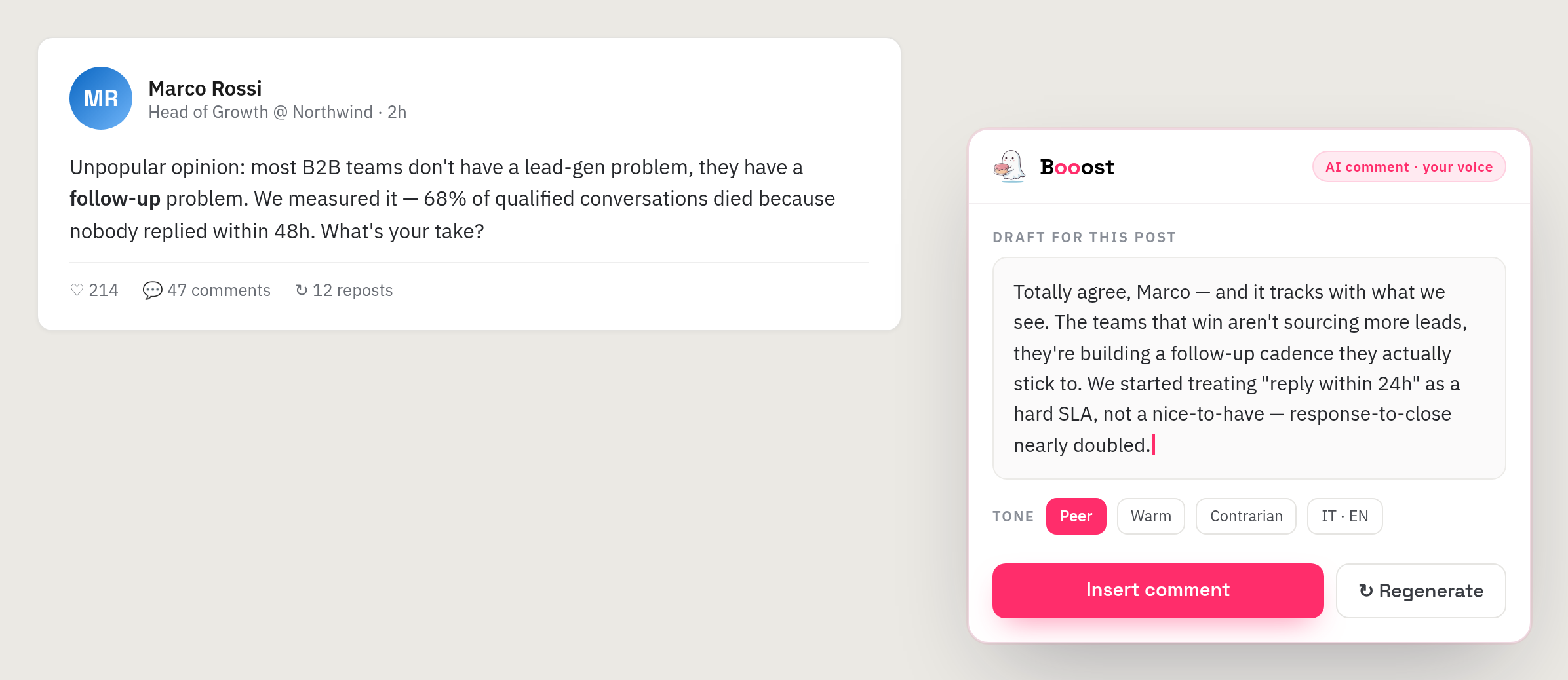
Booost reads the full post first, then drafts in your tone — genuinely relevant, never a generic "Great post!".
Accurate tone and idioms for your audience's language — not a word-for-word translation.
Pick a tone, insert, post it yourself. You stay in control of every comment.
Ten thoughtful comments take minutes, not an hour — so showing up every day actually happens.
Add the Chrome extension and plug in your own AI provider key. Two minutes, no account to create.
Browse LinkedIn as usual. On any post, Booost reads the full context — topic, tone and language.
Hit the Booost button, pick a tone, and a comment in your voice appears — you edit and post it yourself. Nothing is automated.
Sixteen tools that used to be five subscriptions — contact intelligence, outreach, content and inbox — sharing one local database and one safety brain.
Every contact scored on a six-axis radar — thematic fit, seniority, activity, relationship, influence, proximity — with the evidence behind each score, plus a network graph.
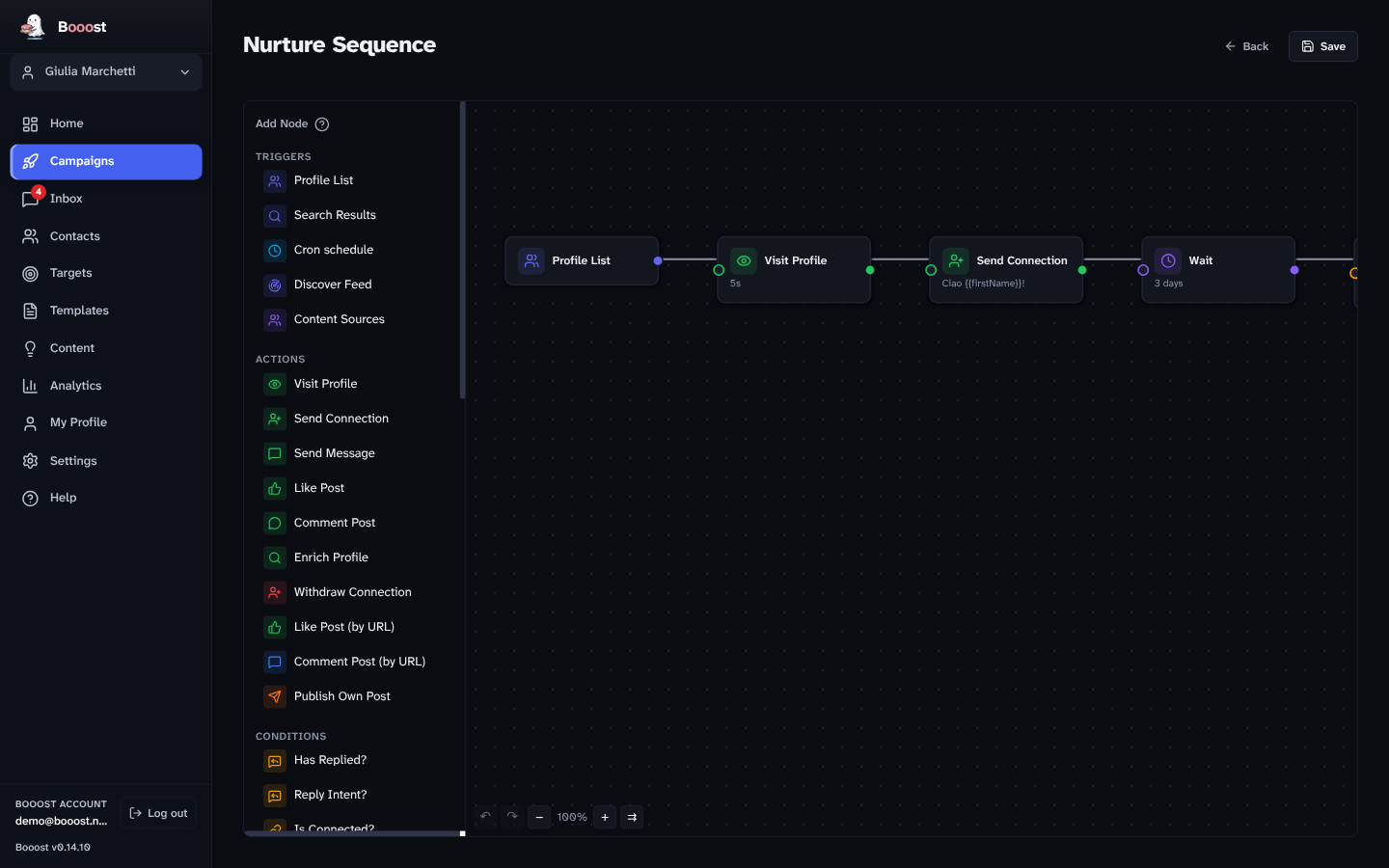
Visual campaigns with triggers, conditions and A/B splits. Eight ready-made plays. Auto-pause on reply, personalized notes, follow-up tracking.
Sources → draft → review → approve → schedule → publish. A quality gate checks every draft against its source — facts only, no invention.
Every conversation synced, sorted by intent. Draft an on-brand reply in one click, grounded in your profile — warm replies first.
A two-minute AI interview learns your role, targets and writing voice. Everything the app generates is grounded in it — and everything a campaign does, a human can veto.
Answer a short interview and connect a LinkedIn or X account in the app's own browser. Booost scores your network on a six-axis radar so you know who's worth your time.
Drag-and-drop campaigns on a canvas, or start from eight ready-made plays. Sequences auto-pause the instant a prospect replies, so a person takes the conversation.
Warm-up, human pacing and a circuit breaker keep every account healthy. You watch results from one control room; the safety system watches the accounts.
The honest fear with every automation tool. Booost is built around the answer — safety is the core design constraint, not a setting you hope you configured right.
Booost Personal and Booost Business each ship in the same three editions, and the split is not a drip-feed of features. Community is free and pays for itself with a signature. Basic is the whole product driven by your own AI key. Pro includes Booost's own AI and everything built on top of it.
Whatever is not named here is in all three editions, and the only quotas in the product are Community's ceilings — every other limit is a safety limit, identical everywhere. The founding offer gives you Pro at Basic's price — below is what it takes. The three editions, line by line →
Booost Business is the desktop app: many accounts from one machine, each with its LinkedIn and X channels, priced per account under management — and the price per account falls as you add them. Booost Personal is the browser extension: one person, one account, a flat monthly price. Community is free on both.
Campaigns, contacts, content pipeline and AI inbox, for every account you manage. Billed per managed account, LinkedIn and X included — never per seat, never per action.
| Accounts | Pro | Basic |
|---|---|---|
| 1–4 | €99 | €79 |
| 5–9 | €79 | €63 |
| 10–24 | €59 | €47 |
| 25–49 | €45 | €36 |
| 50+ | €39 | €31 |
What Booost Business does → · Prices exclude VAT: the VAT due in your country is shown at checkout before you confirm. Billed monthly via Stripe, cancel anytime — your data stays on your machine either way.
AI LinkedIn comments and posts in your own voice, one click on the post you are reading. It drafts; you publish — which is why it is the one edition that automates nothing.
What Booost Personal does → · Prices exclude VAT: the VAT due in your country is shown at checkout before you confirm. Billed monthly via Stripe, cancel anytime — the extension keeps working until the period ends.
Safety is the core design constraint. New accounts warm up from conservative limits over weeks; actions are paced with randomized, human-like delays inside the operating hours you set; a live trust score slows things down when an account's health dips; and a circuit breaker pauses everything the instant a risk signal appears (a CAPTCHA, a rate limit, an unusual response). Campaigns also auto-pause the moment a prospect replies.
On your computer. Profiles, messages, campaigns and activity logs live in a SQLite database on your own disk, and your LinkedIn and X sessions never leave the machine — Booost never receives your password. Export the lot as CSV or JSON whenever you like.
No to both. On the Pro edition Booost's AI is included, so there is no key to hand over. On Basic you bring your own key across 20 providers — then prompts go straight from the app to the provider you picked, and with Ollama the model never leaves your machine at all. Either way you log in to LinkedIn and X yourself, in the app's own browser tab: Booost never receives or stores your LinkedIn or X password.
Personal: minutes. Install the extension, sign in, and comment — on Pro there is no key to configure, on Basic you paste your own. Business: about a quarter of an hour. Install, sign in, create your company, log in to LinkedIn (and X, if you want it) in the app's own browser tab, and answer a two-minute interview that teaches it how you write. Then it deliberately goes slow. A new account starts on conservative daily limits and only earns more over weeks — that is the warm-up, and it is the whole reason accounts survive. Any tool that lets you run flat out on day one is selling you the ban, not the growth.
It belongs to the people who joined the waiting list, which was open from 27 July to 31 August 2026. They get the Pro edition at Basic’s price — €79/month per managed account, or €899/year — locked for as long as the subscription runs, provided they subscribe by 2 October 2026. Everyone else pays the regular prices: Pro €99/account·mo or €999/year, Basic €79/account·mo or €899/year.
Yes — 7 days free on your first managed account, with no card to start and no charge until it ends (waiting-list members got 30). Billing is monthly through Stripe, and Booost never sees your card. Manage or cancel anytime from the Stripe billing portal; your local data stays on your machine either way.
Personal is a Chrome extension for individuals: it drafts a great comment for the post you're reading, one click, you post it yourself. Business is the desktop app for teams and agencies running the whole workflow — multi-step campaigns, the contact radar, the content pipeline, the AI inbox and the anti-ban system, across every account you manage.
That their LinkedIn and X sessions never leave your machine — Booost never receives a password — and that their profiles, messages and campaigns sit in a SQLite file on your own disk, exportable to CSV or JSON the day they ask. Every account keeps its own warm-up state, its own operating hours and its own daily limits, so one client's campaign can never spend another's. What our servers do handle is the shape of the network — that is what powers the contact intelligence, and it is in the plan. You pay €79 per month per managed account, not a seat tax on your team.
Research and operating detail on LinkedIn and X growth that lasts — what actually triggers a restriction, what it costs when it happens, and what to do instead.
One desktop application for Windows, macOS and Linux. Your LinkedIn and X sessions stay on your machine, the first week is free, and there is nothing to set up on a server.
Windows · macOS · Linux · 7 days free on your first managed account · no card to start · cancel anytime